Help CenterCommunication Channels

Communication Channels

Connect WhatsApp, Telegram, Email, Instagram, and Voice so customers can reach you on their favorite channel.

8 min read

Channel overview

Channel overview
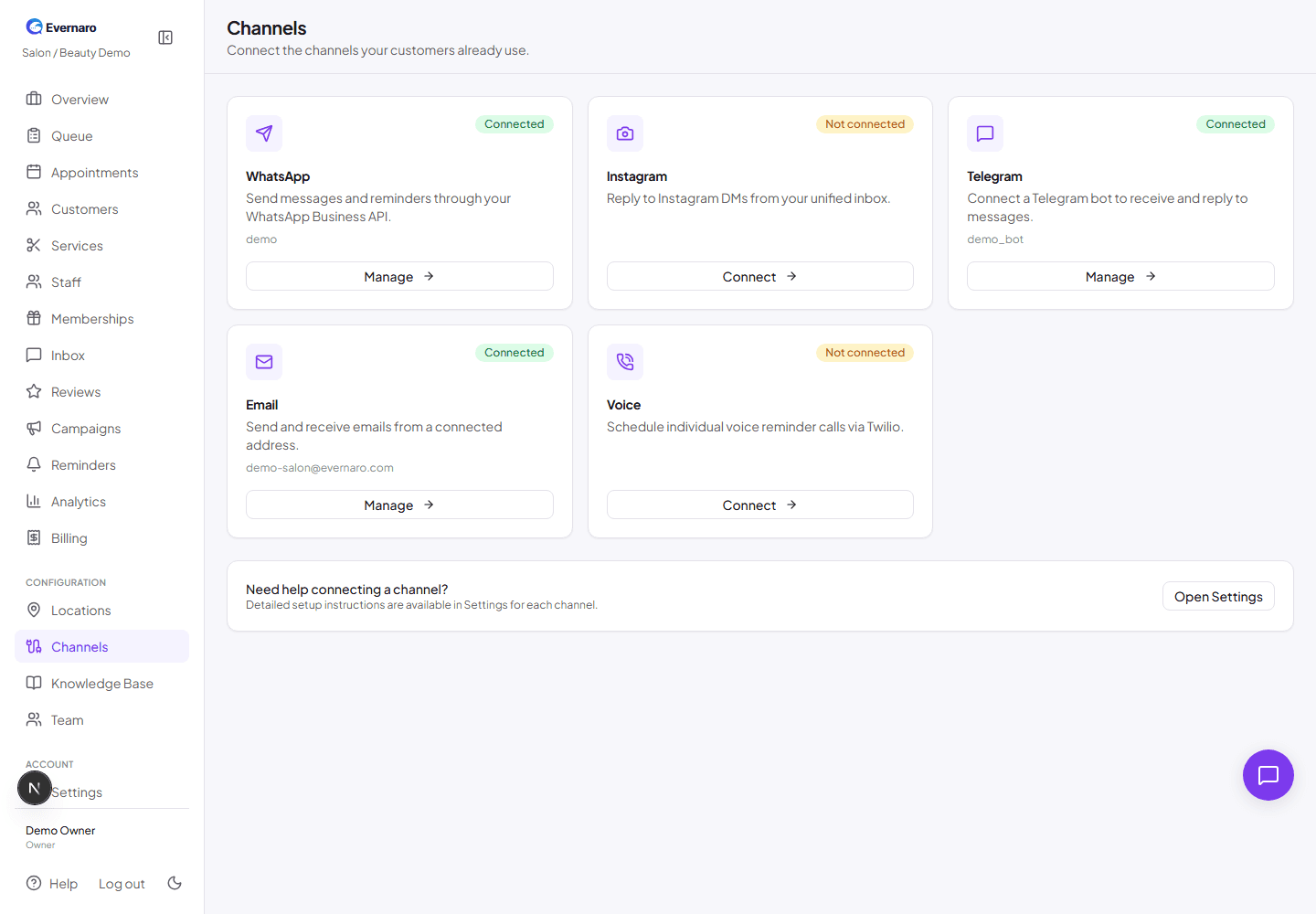
Channels page shows which communication channels are connected and which still need setup.

Evernaro can send and receive messages through five channels. You do not need to connect all of them. Start with the ones your customers already use.

Supported channels:

  • WhatsApp (via Gupshup)
  • Telegram
  • Email (via Resend)
  • Instagram
  • Voice reminders (via Twilio)

Important: Each channel requires credentials from a separate provider. Evernaro never shares your provider credentials and stores them encrypted in your database.

WhatsApp via Gupshup

WhatsApp messages are sent through the Gupshup WhatsApp Business API. You need a Gupshup account with an approved WhatsApp Business app and templates.

What you need from Gupshup:

  • API key: Found in your Gupshup dashboard.
  • App name: The name of your WhatsApp app in Gupshup.
  • App ID: A GUID for your Gupshup app.
  • Source number: Your registered WhatsApp business number without the leading +.

Steps:

  1. Go to Channels and click Connect on WhatsApp.
  2. Enter the API key, app name, app ID, and source number.
  3. Evernaro validates the credentials and saves them encrypted.
  4. Copy the webhook URL shown after connection and paste it into your Gupshup dashboard.
  5. Create message templates in Gupshup for campaigns and reminders, then sync them in Evernaro.

Note: You cannot send free-text WhatsApp messages to customers outside the 24-hour service window unless you use an approved template. Evernaro enforces this automatically.
Telegram

Telegram uses a bot that you create with BotFather.

  1. Open Telegram and message @BotFather.
  2. Use /newbot and follow the prompts to create a bot.
  3. Copy the bot token that BotFather gives you.
  4. In Evernaro, go to Channels → Telegram → Connect and paste the token.
  5. Set the webhook URL in your bot settings so Telegram can deliver incoming messages to Evernaro.

Tip: Customers can start a conversation by messaging your bot username.

Email via Resend

Outbound emails are sent through Resend. You need a Resend account and a verified sender domain.

  1. Sign up at Resend and verify your domain (for example, evernaro.com or your own domain).
  2. Generate an API key.
  3. In Evernaro, go to Channels → Email → Connect.
  4. Enter the sender address and Resend API key.
  5. Save the channel.

Note: Email deliverability depends on your domain reputation. Resend handles sending, bounces, and reputation monitoring.

Instagram

Instagram requires a Meta Business account, a Facebook Page connected to your Instagram Professional account, and a Meta App with the Instagram messaging permissions.

What you need:

  • Meta App ID and App Secret.
  • Page Access Token for the connected Facebook Page.
  • Instagram Professional account linked to that page.
  • Webhook subscription configured in Meta to point to Evernaro.

Note: Instagram setup is the most involved channel. You may need platform-admin assistance to complete Meta verification and webhook configuration.

Voice reminders via Twilio

Voice is used only for scheduled reminder calls, not for two-way messaging. You need a Twilio account with a voice-capable phone number.

What you need:

  • Twilio Account SID.
  • Twilio Auth Token.
  • Twilio phone number with voice capability.

Tip: Voice reminders are triggered from the Reminders page. Use them sparingly for important appointments or payment follow-ups.